Back in Part 4 I ended with a confession: everything so far was built by hand, and the Automated requirement from Part 2 was a dream state. Then I got excited and skipped ahead with From zero to NetDevOps, where I casually said “the source of truth is topology.yml, which I haven’t written about yet” and moved right along.
So let’s open it up. This one is about the topology and the generator, and why most of the network config isn’t actually written down or done by hand.
How many things have to agree?
Before the generator, adding the BR-to-BR tunnel from Part 4 meant touching two routers and getting about ten things exactly right. I got one wrong. The tunnel came up, OSPF did not, and I spent a good while staring at a perfectly healthy WireGuard interface before noticing I’d pasted br1’s public key into br1’s own peer config.
Here’s what a single tunnel needs, end to end:
- a WireGuard keypair on each side, with each public key copied to the other router
- a /31 out of the link pool, one address per side, and the far end better have the other one
- a listen port on the border that encodes which WAN it goes through
- endpoint address and port on the edge side,
allowed-address,persistent-keepalive, MTU - an OSPF interface template with the right network type and cost
- BFD timers that match the link (cable/fiber gets fast, 5G gets relaxed)
Multiply that by every tunnel in the mesh, and every value has a twin on another router that has to match exactly. At last count the generator manages 48 keys. 48 base64 blobs that all look identical to a me at 11pm at night.
None of it is hard, but all of it is tedious. The failure is never “I don’t understand OSPF,” it’s “Shit, I put 51821 on one side and 51812 on the other.”
The Topology file
The whole thing began from my OCS/Lync/Skype brain talking. Back when I was doing a whole lot of UC deployments, the topology XML file (.tbxml) was EVERYTHING to bootstrap the setup or make changes. Then, the Topology Builder would just take that and propagate it out to SQL tables and each server magically “knew” what to self-deploy and point to. It was super weird at first, but it worked, and it was pretty straightforward to then replace a bad front end or edge server with this.
So I took that topology concept in an attempt to codify my configuration. The Topology file has one rule: only facts you can’t compute from other facts
Everything else is one of four things: assumed (sane defaults), derived (math on the facts), random (keys and secrets), or it just doesn’t matter.
Below is a trimmed version of it with all comments and non-essential extras removed. The real one has a metric shitton of AI-generated comments, since it will live in a public repo one day.
asn: 394857
prefix: 199.202.154.0/24

blocks:
  loopback: 199.202.154.248/29
  links:    199.202.154.192/27

defaults:
  mtu: 1360
  wg_port_base: 51820

wans:
  wan1: { cost: 10,  bfd: standard }
  wan2: { cost: 100, bfd: chill }

routers:
  br1.ord1:
    id: 1
    role: border
    public: 45.x.x.x
    upstream: { name: vultr, asn: XXXXX, peer: 169.254.169.254 }
  br2.ord2:
    id: 2
    role: border
    public: 23.x.x.x
    upstream: { name: hosthatch, asn: XXXXX, peer: 169.254.169.254 }
  er1.hdc: { id: 3, role: edge, wans: [wan1, wan2] }
  er2.hdc: { id: 4, role: edge, wans: [wan1, wan2] }
Full file is about 50 useful lines (ok, maybe a few more…). Router names, roles, providers, ASNs, which WANs exist and how much I trust them.
Notice what’s not there… no tunnel list, no interface addresses, no ports, no keys, no OSPF or BGP config, no DNS records. ALL of these are needed, but also ALL of these are built out.
What gets derived
generator.py reads the file, expands it, and writes out everything else:
flowchart LR
    T["topology.yml"] --> G["generator.py"]
    K["keys.json"] <--> G
    A["api.escarra.org<br/>SSH keys, mgmt prefixes"] --> G
    G --> R[".rsc files<br/>one per router"]
    G --> D["Route 53<br/>A + PTR records"]
    G --> S["SNMPv3<br/>for Zabbix monitoring"]
    G --> I["inventory.yml<br/>for Ansible deploy"]
    G --> P["pipeline.yml<br/>GitLab child pipeline"]
    G --> M["tests.json<br/>test expectations"]
Some routing-specific details not clearly visible here:
- Tunnels: every edge to every border over every WAN that edge has, plus border to border. Give an edge router a third WAN and it grows two tunnels without me listing them at all.
- Ports:
wg_port_baseplus the WAN index on the border side. Same “the port tells you which WAN” scheme from Part 3, except now nobody has to remember it. It’s all math (or arithmetic? whatever). - OSPF cost: comes from the WAN config, never from the tunnel. BR-to-BR gets a cost high enough that it’s never preferred.
- iBGP: full mesh, every router to every other router, loopback to loopback. Computed, never listed.
- Anchor route and outbound eBGP filter: emitted only for
role: border. Edges physically cannot end up with a blackhole for my own /24, because the template that renders it never runs for them.
Proper PTRs!
Remember the public infrastructure addressing from Part 3, and how part of the payoff was pretty traceroutes? That only works with proper PTR records.
Every interface address is already derived, so the generator also emits the A and PTR records for all of them (116 at last count) and they get pushed to Route 53. Add a router, the traceroute through it has names before the router even exists. I would never have kept 116 DNS records in sync by hand. I know this because I sure as hell didn’t on my split-view DNS hell.
Not EVERY fact lives in the file
Two inputs come from outside on purpose from my API endpoints: SSH public keys and the management source prefixes, both pulled from my own API endpoint at build time.
Those aren’t facts about the network. They’re facts about me. Putting them in topology.yml would mean a commit every time my laptop’s key changes or I move somewhere with a different egress. Same rule, applied one level up: if it changes for reasons that have nothing to do with the topology, it doesn’t belong in the topology.
WireGuard Key automations
Back to the bug that started all this. The fix is making key handling idempotent:
- Keys live in
keys.json, mode 600, keyed by tunnel identity and router. Never intopology.yml, never in git. The downside to this is bootstrap deployments need to happen outside GitLab for now… - Any tunnel end without a private key gets one generated. Anything that already has one is left alone.
- Public keys are never stored by hand. They’re derived from the private key at render time, and each router’s peer config pulls the other end’s public key automatically.
The build output from the NetDevOps post shows this every run:
keys: 48 total (0 newly generated, 48 reused) [keys.json, mode 600]
Zero newly generated is the boring line you want to see every single time. Run it twice, get the same output twice. Add a tunnel, it generates exactly the keys that tunnel needs and touches nothing else.
Rotating a key is now deleting one entry and regenerating. This is automated enough where key rotations can be done at any time, and THAT is the ephemeral dream.
Full > Diff
Each router gets one .rsc script, and the decision that shapes everything downstream is that the scripts are add-only and assume a blank device. No “update if exists,” no diffing against what’s on the box because in RouterOS that gets complex and error-prone. I’ve been bitten by this plenty of times in the past, and really wanted to treat each router as if it were brand new, a container mindset.
So, the config is just a list of add commands in an order that works on an empty router:
/interface/bridge/add name=loopback0
/interface/wireguard/add name=wg-br1-wan1 listen-port=51821 mtu=1360 \
    private-key="...youwish..."
/ip/address/add address=199.202.154.249/32 interface=loopback0
...
/routing/ospf/instance/add name=v2 router-id=199.202.154.249
...
/routing/bgp/connection/add name=ibgp-er1 ...
The template renders in layers because things have to exist before something references them: interfaces, then addresses, then filters, then OSPF, then BGP, otherwise you’re referencing an object that’s not there and that’s where the entire configuration STOPS and you end up with a half-configured box. Same layering as the protocol stack from Part 3, which is a nice coincidence and also not really a coincidence.
To be fair, I tried the other, more “differential” way first because why should I overwrite an entire config and reboot boxes if I’m just making an interface name change? I generated configs, pasted over live ones, “it’ll just update what changed,” and all hell broke loose until I was on a VNC console recovering a router.
Making a RouterOS script safely re-runnable against live state is a rabbit hole with no bottom… Every section has slightly different semantics, some things can be set by name and some can’t, and the moment the script has to reason about current state it’s no longer a pure function of the topology. This wasn’t “cattle”, this was “pets”.
Add-only against a blank box means the rendered file is the config, completely, every time. How it gets applied (wipe and replay, one router at a time) is all in the NetDevOps post’s.
Adding a router is now one line
The payoff. Say a third edge router shows up someday…
er3.hdc: { id: 5, role: edge, wans: [wan1] }
Run the generator and out comes: a config for er3, new tunnels with keys and /31s, updated configs for both borders with their new peers, iBGP sessions from everyone to er3, new DNS records (yay for proper reverse!), updated Ansible inventory, updated test expectations, and a child pipeline with two more rollout jobs (deploy and test) plus chaos steps. Existing tunnels stay byte for byte identical, which I can see in the diff.
The topology file says what I want. The generator handles every consequence. My job shrinks to making good decisions in 50 lines instead of pasting base64 at midnight.
What I have to do before, single step, is bootstrap the new router with an SSH key so Ansible can go and do work, and then commit the code. It’s THAT EASY.
I’ve had to completely rebuild routers in Vultr to move between billing plans three times already, and it takes me about 10 minutes end-to-end each time.
So, pardon my french, but holy shit… isn’t that the dream? New router, one line and let the pipeline do its thing. I did all the work upfront and now the entire thing just manages itself!.
Welcome to “cloud thinking” here…
There’s more in the file than routers
So far I’ve made topology.yml sound like a list of four routers and some WANs. That was true for about a week. Then every time something broke, or I wanted something new, the answer was “well, that’s a fact about the network, so it goes in the file.” The rule never changed, the file just kept finding more facts.
Here’s the rest of it.
Carving the /24
The trimmed version above had two pools. The real file splits the whole /24 into blocks, one per job:
blocks:
  home:           199.202.154.0/25      # -> pfSense
  site_deleg:     199.202.154.128/27    # remote-site /29s
  backbone:       199.202.154.160/28    # BR<->BR /31s
  site_p2p:       199.202.154.176/28    # remote-site tunnel /31s
  br_er_p2p:      199.202.154.192/27    # BR<->ER /31s
  local_links:    199.202.154.224/28    # ER interconnect + pfSense transit
  loopbacks:      199.202.154.240/28
Do the math and it adds up to exactly 256. Every single address in the /24 has a job. That felt very efficient right up until I realized it also means there is zero v4 left over for anything I didn’t plan for.
The blocks are also budgets. site_p2p is a /28, which is 8 /31s, and every remote site needs one per border router. That’s four sites, hard stop, and a third border router cuts it to two sites. The generator refuses to render past that instead of quietly renumbering live links to make room, because “I added a site and every other site’s tunnel moved” is the exact problem sticky allocation exists to prevent.
The v6 blocks (a teaser)
IPv6 gets its own blocks, and the nice part is that the generator reuses the same index math as v4. Only the base changes. A loopback that’s .241 in v4 lands in the loopback /60 in v6, a BR-to-ER /31 has a /127 twin in the same slot, and so on.
prefix_v6:    2602:F33E::/40      # what ARIN gave me
aggregate_v6: 2602:F33E::/42      # what I actually announce
aws_byoip_v6: 2602:F33E:FC::/46   # what Amazon announces for me

blocks_v6:
  customer_home:  2602:F33E:1::/48
  loopbacks:      2602:F33E:0:0000::/60
  backbone:       2602:F33E:0:0010::/60
  br_er_p2p:      2602:F33E:0:0030::/60
  local_links:    2602:F33E:0:0040::/60
  peer_p2p:       2602:F33E:0:0050::/60
prefix_v6 is the master switch. Set it, and v6 turns on everywhere. And yes, I’m announcing a /42 out of a /40 on purpose. The why and why it involves AWS and four separate ROAs, is a whole story coming on Part 6.
Things the routers themselves need
Not everything in the file is about routing. The routers need DNS and time like any other box, and both of those got the “fact about the network” treatment.
DNS is public anycast, on purpose. No router in the border/edge network is allowed to depend on my internal DNS fleet. The edge is how you reach everything else, so it can’t sit behind anything else. RouterOS doesn’t really give you a choice anyway, since /ip/dns is a forwarding cache with no recursion. It NEEDS upstreams or things work halfway (like my SSH keys and management address refresh scripts).
dns_servers:
  - 1.1.1.1                    # Cloudflare
  - 8.8.8.8                    # Google
  - 9.9.9.10                   # Quad9, unfiltered
  - 2606:4700:4700::1111       # Cloudflare v6
  - 2001:4860:4860::8888       # Google v6
Multiple operators, multiple anycast clouds, dual-stack so a bad day on v4 transit doesn’t cost me name resolution.
NTP is by IP, not by name. This one sounds fussy until you get bitten. The routers fetch SSH keys and management prefixes over HTTPS with certificate checking on, and a router that boots with a skewed clock fails cert validation on every fetch. It fails safely (nothing changes), but silently, with one log line, and it looks exactly like my API being down. If NTP also depended on DNS, a broken resolver could take down the clock, which takes down the fetches, which looks like something else entirely. So the clock depends on nothing.
ntp_servers:
  - 162.159.200.1              # time.cloudflare.com
  - 162.159.200.123            # time.cloudflare.com
  - 216.239.35.0               # time.google.com
  - 216.239.35.4               # time.google.com
AQM (the VPS tax)
This one took a while to figure out but is the one with the biggest difference in the performance of the whole thing…
The border routers are CHR guests on VPS hosts. I was seeing a soft throughput cap and a pile of tx-queue-drops on ether1, with the CPU sitting at around 6%. The router wasn’t busy but it was dropping packets anyway.
RouterOS ships Ethernet with only-hardware-queue, which skips the software queue and hands packets straight to the driver. On real hardware that’s the fast path. On an oversubscribed hypervisor, the virtual NIC only drains when the host gets around to scheduling it, and when it doesn’t, the ring fills and every packet arriving in that gap gets dropped. Every one of those drops halves TCP window, and you get a cap that has nothing to do with the router or the VPS’s actual capacity.
Same root cause as the relaxed BFD timers on the backbone, by the way. Hypervisor scheduling gaps are just a fact of life on these boxes, I had tuned for it in one place and not the other.
I measured on br1:
| Queue | Throughput | Drops |
|---|---|---|
| fq-codel | ~900 Mb/s | fewest, if any |
| pfifo, 50 packets | ~300 Mb/s | more |
| only-hardware-queue | ~120Mb/s | like WiFi in a microwave factory |
The absolute numbers may move around depending on what the neighbors on the host are doing, but the ordering has been stable every run. fq-codel wins because it has a deep backlog to absorb the stall, while CoDel keeps the latency through that backlog near target. Bonus: flow isolation. eBGP, and the outer UDP of every WireGuard tunnel (carrying OSPF, iBGP and BFD) all share ether1. Under a plain FIFO, a big transit flow can queue in front of BFD packets that have about 600ms to arrive before a tunnel gets declared dead. Not great.
wan_queue: virtual

wan_aqm:
  name:     virtual
  target:   5ms
  interval: 100ms
  limit:    10240
  flows:    1024
  quantum:  1514
  memlimit: 32.0MiB
  ecn:      yes
Two gotchas here: First, fq-codel is a kind in RouterOS, not a queue type name. Write wan_queue: fq-codel and the import fails on that line up top, on a box that reset-configuration has already wiped, and everything after it (BGP, every tunnel) never runs. Again, ask me how I know… So the generator creates the type first, and validates the name against the list of stock types. Second, every value is the RouterOS default, pinned explicitly anyway, because if a future release quietly changes the default target, I’d be chasing a throughput regression nobody could explain.
The home firewalls are customers
The pfSense firewalls at home are not part of AS394857. They’re eBGP customers with private ASNs, peering with both edge routers over a shared transit segment. No VRRP, no WireGuard, no iBGP mesh membership.
firewalls:
  - name:          fwa
    asn:           65010
    peer_address:  199.202.154.236
    peer_address_v6: 2602:F33E:0:41::10
    bfd:           true
    delegations:
      - prefix:  199.202.154.0/28
        max_len: 32
    delegations_v6:
      - prefix:  2602:F33E:1:100::/56
        max_len: 64
A firewall gets exactly what the file grants it and nothing more. Two ways to grant: allowed_vips (this EXACT prefix, period) or delegations (here’s a block, carve it however you like down to max_len). Both compile to the same inbound filter on the ERs, and that filter is the security boundary. So from the pfSense I can use the whole /28, or I can advertise /32s individually for what I consume, and blackhole the rest upstream.
The cool part is that the BGP session is the health check. A firewall advertising a VIP is what makes the ERs originate the home /25. Firewall dies, session drops, route goes away. No ping-based health scripts. The ERs send a default so the firewalls can choose to ECMP their outbound across them since we’re not tracking past the firewalls anyway, all stateless after them.
There’s also a type: unifi option (commented out for now) that makes the generator render the UniFi BGP side of the session too as an FRR config file I can just upload. Only reason I don’t use it now is BGP takes precedence over my direct ISP routes, and my “Home Network” which UniFi serves is separate from my “Lab Network” which the ERs and the pfSenses sit, so I wanted the separation by design anyway. But it works like a charm and has more uptime than the providers individually.
Third parties, in three flavors
This is the newest part of the file and none of it is turned on yet, but it’s all built and rolled out. External peers terminate on border routers only, so that’s the current config.
Every peer has a realm, and the realm decides which routing table its routes land in:
flowchart LR
    I["internet peer"] --> M["main table<br/>real traffic follows these"]
    P["3p peer"] --> V3["vrf 3p<br/>same exchange, own table"]
D["dn42 peer"] --> VD["vrf dn42<br/>separate overlay entirely"]- internet: settlement-free peering in the main table. I announce my aggregates, I accept their cone, and I never pass one peer’s routes to another peer or to an upstream.
- 3p: the same exchange, real ASN, real prefixes, but landed in its own VRF. A 3p peer can’t influence how production traffic gets forwarded, because production never looks at that table. Announcements carry NO_EXPORT by default so a bilateral interconnect stays bilateral.
- dn42: the DN42 hobbyist overlay. Its own ASN, its own address space, its own table.
The rule from the top of this post shows up here too. Everything about my side of a peering session is derived: interface name, listen port, keys, filter chain names. Everything about their side is declared, because I can’t compute someone else’s public key or their prefixes. And if you declare a value the generator could have derived, it refuses the file instead of quietly using yours.
Two other things worth calling out:
I can NEVER become transit. Every peer-out filter chain ends in a terminal reject. That’s structural, not something I have to remember. Accidentally leaking one provider’s routes to another is how you end up on the front page of a BGP incident blog, and I’d rather be on the front page of mine.
There’s no v4 to give. Remember the /24 being 100% allocated? That means a v4 peering link has to be numbered from the other network’s space, or not exist. A v6-only session is a complete session, and “I’ll number v6, you number v4 if you want v4” is the best i can do for now
Secrets for peers (WireGuard PSK, BGP MD5) are booleans in the file. Set md5: true and the generator creates the key in keys.json. Full confession: my upstream BGP passwords are still sitting in topology.yml in plaintext, which breaks the file’s own “no secrets” promise even if the key only works on a P2P link. On the list to change… Do as I say, not as I did.
dn42 + VRF
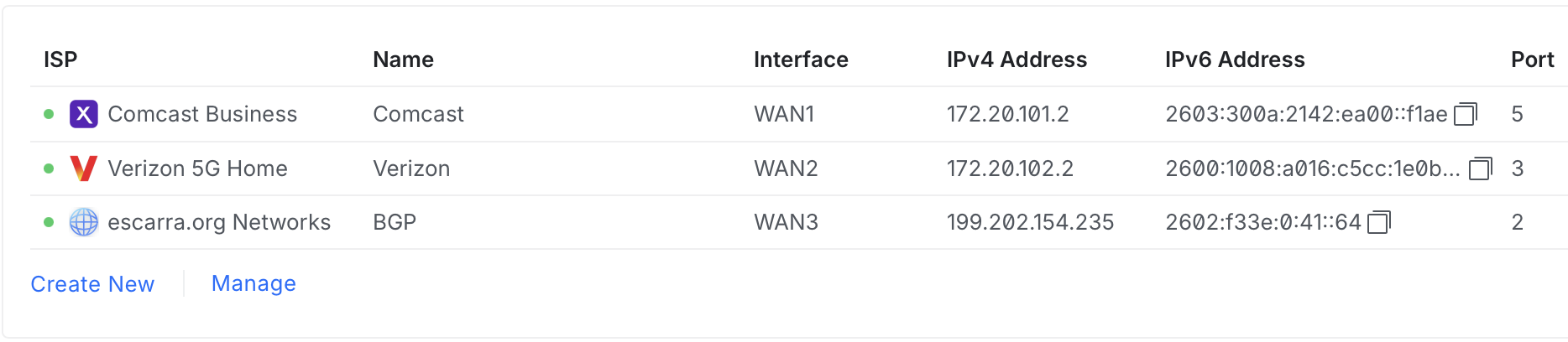
DN42 deserves its own callout because of one beautiful collision. DN42 lives in 172.20.0.0/14. My edge routers’ WAN addressing is 172.20.101.0/24 and 172.20.102.0/24, inside the home LAN behind the ISP gear.
Plus, since dn42 is meant to play with, I’d rather drop in a VRF and leak routes as needed and not have it mess with public.
So, about “50 useful lines” eh?
Yeah… well…
It STARTED at 50.
The routers, roles, providers and WANs still fit in about that. Everything else is the same rule applied over and over: when something bit me, I found the fact underneath it, wrote that fact down once, and let the generator handle every consequence.
The file grew, but the amount of stuff I do by hand didn’t, and THAT’s the point.
Next up, Part 6: IPv6! (yes, I waited for Part 6 for it on purpose, and now you know there’s a /42 mystery waiting there too)