In an adjacent post to the “My own piece of the Internet” series, I realized this NetDevOps thing was WAY more interesting and deserves its own write up in advance. I’m bringing the current state into the fold here, even if the order of operations for the posts gets messed up.
So for this, I’ll walk through the benefits of NetDevOps, how I’ve deployed it internally, and what sharp edges I got cut with.
Which has me feeling like this:

Bro, NetDevOps?
So in Part 4 I moved prefix origination out to the border routers and then admitted that I had built and maintained this whole thing by hand for four posts. That Automated requirement? Dream state.
I realized what I was indirectly looking for was to implement NetDevOps, which is basically applying DevOps principles to network engineering and operations. If you can deploy and manage apps with code and pipelines, why can’t we do the same with our network architecture? At its core, NetDevOps is:
- Network as Code where we build Infrastructure as Code, but with network components
- Version Control with Git repos
- A CI/CD pipeline that does the heavy lifting: validate, build, deploy and test
One file, everything else derived
The source of truth in the whole setup is topology.yml, which I haven’t written about yet. It’s about 40 useful lines and a metric shitton of comments so I can commit it on a public repo and can be useful.
I fought to keep it small, everything in it should be something I can’t compute from something else. Things like router names, providers, ASNs, which WAN a tunnel rides, OSPF costs, are “static” in the way they define the architecture, but everything else can be either assumed, derived, random, or it doesn’t belong.
Literally EVERYTHING else gets generated from it.
flowchart LR
    T["topology.yml"] --> C["Router Configs<br/>one .rsc per device"]
    T --> I["Ansible inventory"]
    T --> R["Route 53<br/>A and PTR records"]
    T --> E["test expectations"]
    T ==> P["the CI pipeline itself"]
That last arrow in bold? That’s what we’re diving a bit into on the post
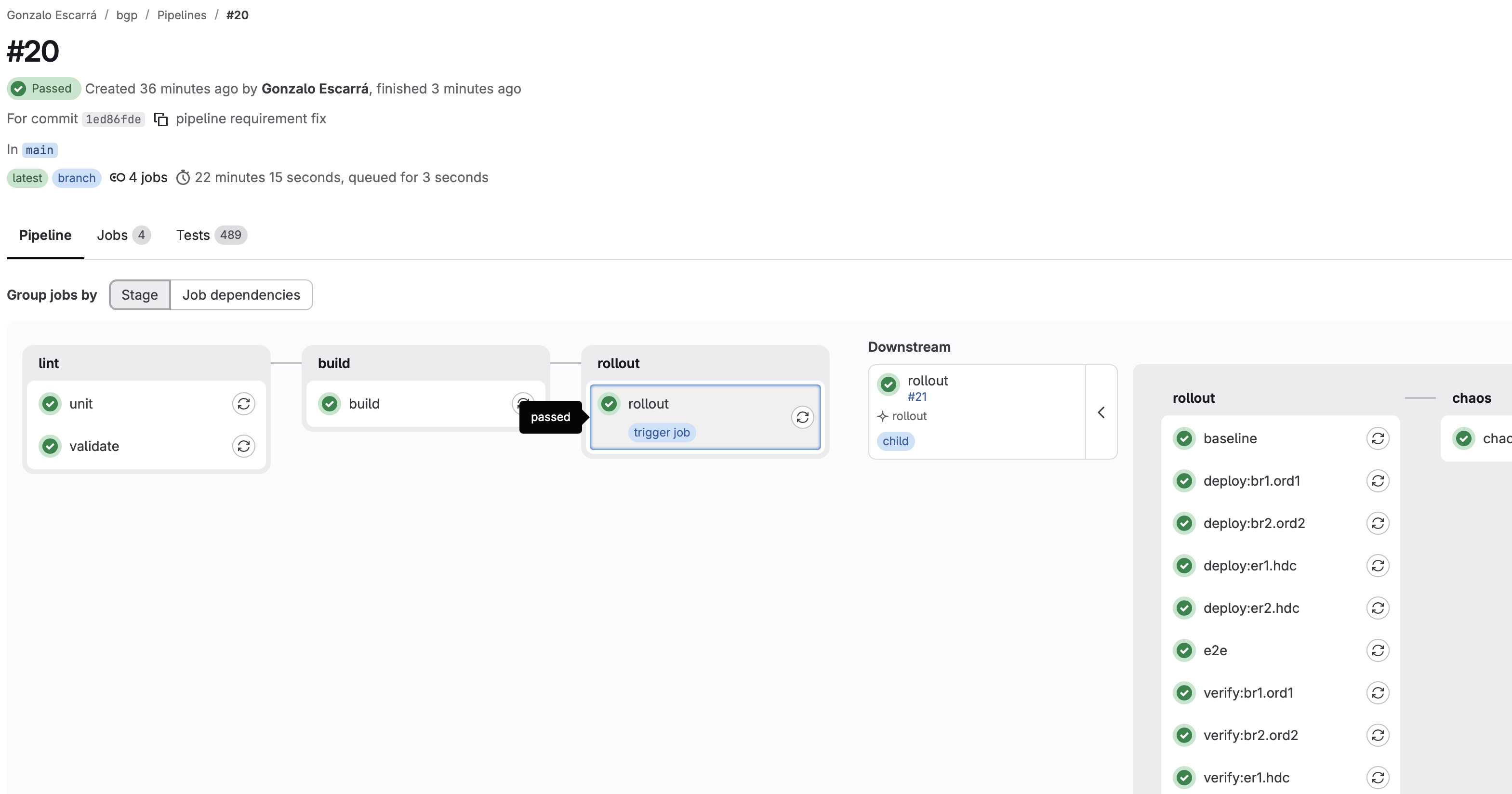
Here’s a pretty picture of what that looks like for me:
-
Lint: Where we check things are where they should be. Syntax testing (because YAML sucks sometimes). Validating that the values are what they should be…
-
Build: Runs the
generator.pyand builds artifacts mentioned in the diagram above. We get:
keys: 48 total (0 newly generated, 48 reused)  [keys.json, mode 600]
ssh: 1 public key(s) for user 'gonzalo' from https://api.escarra.org/sshkeys
mgmt: 1 committed + 2 from https://api.escarra.org/mgmtprefixes = 3 source prefix(es)
  -> out/br1.ord1.rsc
  -> out/br2.ord2.rsc
  -> out/er1.hdc.rsc
  -> out/er2.hdc.rsc
  -> out/dns_records.csv (116 records)
  -> out/dns_zones.env
  -> out/snmp_zabbix.env (SNMPv3 credentials, mode 600)
  -> out/manifest.json (4 routers, test expectations)
  -> out/inventory.yml (ansible; rollout order br1.ord1 -> er1.hdc -> br2.ord2 -> er2.hdc)
  -> out/pipeline.yml (gitlab child pipeline, 8 rollout jobs)
-
Rollout: It calls out a child pipeline based on the generated configurations (how many devices do we have to push this to?). It then runs Ansible against the inventory.yml per device, and rolls out one at a time then tests it before moving to the next.
-
Chaos: A manual optional step, to inject faults into the network and trigger failure modes not seen through configuration rollouts.
On the Rollout pipeline call, the actual child pipeline is a build artifact. I didn’t hand-write the GitLab job graph. A script reads the topology and emits the YAML for the rollout, which GitLab then runs as a child pipeline.
The main reason for this was flexibility. If I add a fifth router, the tests, and the CI job graph together, in one commit, with nobody editing YAML by hand and nobody forgetting to add the matching verify job. It basically steps-through each device, rollout then test, move on…
The classic failure of network automation is the inventory and the tests drifting apart, eventually the tests are just full of BS, a false sense of security. This central approach makes drift structurally impossible, because they’re all outputs of the same input, the topology file.
This was mostly influenced from my OCS/Lync/Skype days: The topology file is EVERYTHING
Green may not mean Go!
I can log into all four routers right now and everything says it’s fine. eBGP sessions established. OSPF adjacencies full. iBGP up. Routes present. Every check I could write against that state passes, and I could put it all on a dashboard and it would be green all day. However…
None of that proves the network actually works.
State is what’s easy to query, so state is where most network testing stops. But a network can be in a perfectly healthy state and fall over the second you take something away, and it can also be in a perfectly healthy-looking state while quietly delivering nothing. You need a “normal” state and a way to see that end-to-end.
So the test suite asserts three things, in increasing order of how hard they are to fake:
- The config is what I meant. 173 offline tests, no network required. In other words: “did the generator produce the thing the topology says?”
- The router matches the config. Live SSH probes after every deploy via Ansible. Because “I generated it” and “it’s running” are different claims.
- The path actually works. One HTTP request, from the inside network.
One HTTP GET to rule them all
The nice thing is my CI runner is on-prem GitLab on Docker. It lives behind the pfSense firewalls, inside the customer network, which means the runner’s own egress path is the thing being tested. I don’t have to worry about some public cloud service tunneling back, or controlling a runner elsewhere.
So a simple test would be:
def test_egress_is_our_own_space():
    seen = requests.get("https://api.escarra.org/ip", timeout=10).text.strip()
    assert ip_address(seen) in ip_network("198.51.100.0/24")
That one line proves, all at once:
- the prefix is in the global routing table
- an origination anchor is up on at least one border router
- at least one upstream is accepting and carrying it
- the WireGuard tunnels are actually passing traffic, not just claiming to be up
- the return path found its way home through the whole fabric
No amount of green session state fakes that. Either a stranger’s web server saw a packet from my address space and got a reply back to me, or it didn’t.
The one thing it does not show is HOW we get that (a traceroute would), but hey if it works then it’s operational, even in a degraded state.
The rollout
Eleven generated jobs, four routers, one at a time:
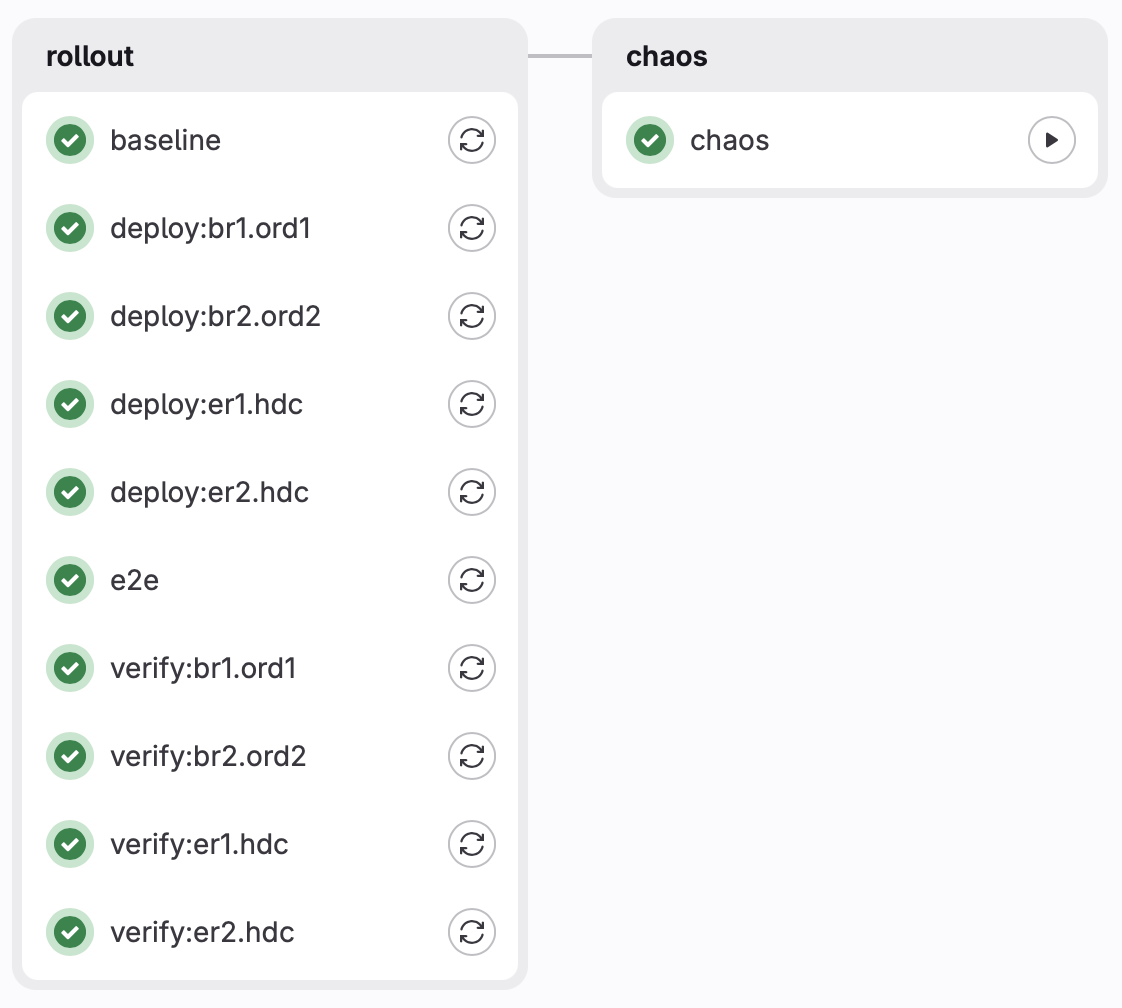
Border, then edge, then border, then edge. Alternating on purpose, so a bad deploy never strands both halves of a redundant pair. If br1 and br2 went back to back and the second one failed before first one was back online, I’d have no borders. This alternating-with-tests way the worst case is one broken box with its partner still carrying traffic.
The gate is the part I’m pretty excited about because it’s all automatic. It isn’t a check inside a script. It’s a GitLab needs:, claiming a dependency on verification and testing BEFORE moving on.
deploy:er1:
  needs: [verify:br1]
A failing test doesn’t stop the next job, nor does it make it available for manual deployment. It means the next job never becomes eligible to exist. There’s no if statement anybody can forget to write, no || exit 1 somebody drops during a refactor. The dependency is the safety mechanism itself.
Also: needs: can only reference the same stage or an earlier one, which quietly kills the obvious deploy/verify stage split you’d reach for first. Took me a bit to figure out why my fancy two-stage design wouldn’t submit.
There’s no rollback, on purpose
The apply path is a destructive reset (more on that in a second), so “rolling back” means running the same destructive apply again, on a box that just demonstrated it can’t come back from a destructive apply.
So if shit goes wrong, the pipeline stops and waits for me, mr. human handy with console access. This was a deliberate design decision. I’d rather have one broken router with me looking at it than an automated system confidently making it all worse at 3am.
“Destructive” you say?
For RouterOS specifically, the generated configs are add-only scripts that assume a blank device. Import one on top of a live config and it collides on the first entry that already exists, then things get very VERY weird.
This was my first try at this once I wired up the generator, just copy/paste over the configs and then all hell broke loose, leaving me to console access via VNC to recover.
So the apply model is simple, reset-then-apply, and that way it’s PREDICTABLE each time. Ansible does:
/system/reset-configuration no-defaults=yes skip-backup=yes \
    keep-users=yes run-after-reset=br1.ord1.rsc
The box wipes itself, reboots, and replays the generated script against an empty config. It starts from ZERO every single time I change something in the config.
Every deploy produces a router that is byte for byte what the templates say, with ZERO accumulated drift, and an easy drift-correction if config changes manually. But… it also means every deploy is a real outage for that device, which is exactly why the rollout is one router at a time, and why the ordering matters. You don’t get idempotent-and-fast with this, you get reproducible-and-disruptive, and I’ll take that trade because it tests WHILE it rolls out. It’s almost like automatically moving to your DR datacenter on purpose on every disruptive prod change you make.
In a way, this is very similar to a container mindset, ephemeral behavior built-in. The starting from zero every time is pretty much like a container image. The only “step up” from here would be rebuilding a router VM on every apply, or getting the ability to auto-scale by provisioning new routers on-demand (hold my beer, one day that’ll come)
The failure mode that drove most of the testing
RouterOS stops at the first line it can’t parse, and then silently skips everything after it.
Think about that. A router that failed on line 700 of a 900 line script comes back up, answers SSH, reports the right identity, has the right addresses, but may have no BGP at all. Nothing about it looks wrong. There’s no error state, no flag, no partial-config warning UNTIL you log in to the console or check the logs.
That single behavior is responsible for a large chunk of the verification suite, and for one of the better bugs below. It’s also a behavior that I’ve cursed until I learned to just accept it.
Deploy transport is boring on purpose
Plain SSH through Ansible, not the REST API. Same door a human uses, so nothing depends on a service the box might not have brought up yet after that reset. Basically, the steps I would do should be similar or same steps followed in testing. I can work backwards from my own command history to build the testing framework.
Structured data comes back through RouterOS 7.13+’s :serialize to=json, and the entire per-router state snapshot arrives in one round trip. That’s faster, but the real reason is consistency: everything in the snapshot was true at the same instant, instead of smeared across a minute of reconnects during which the thing I’m testing might have changed underneath me.
Ansible orchestrates, pytest asserts. Playbooks do ordering, retries, serial: 1 style. Every actual claim about the network is a pytest assertion, because assertions want structured data, real fixtures, and a JUnit report that shows up in GitLab’s test tab like test_ibgp_sessions_are_established[br2.ord2]. This shows which router, which check, without opening a single log.
Chaos! (with a safeguard)

I wanted to take it to the next level and inject fault on purpose. Three scenarios, each breaking a live path on purpose, then it re-runs the same end to end test the deployment gates on. and makes sure things are a-ok.
The scenarios so far:
- Disable WAN1 on both ERs, simulating an internet provider failure
- Disable all BGP sessions on BR1, then BR2, including eBGP, simulating an upstream provider failure (and yes, we are creating DFZ updates with this)
- Disable all BGP sessions on ER1, then ER2, including iBGP towards the firewalls (and this one is potentially dangerous and can lock me out if we got here by passing tests that weren’t real)
The Chaos step is manual only because the right time to run this is when you’re watching it, not while you’re out watching the latest episode of Silo and drawing parallels to the “Safeguard” coming next:
Every scenario schedules its own undo on the router before it breaks anything. An Ansible always: block is not enough, because always: runs when a task fails, but does not run when the process dies. A chaos test whose entire purpose is to sever a network path is unusually likely to sever the path that the restore would have travelled over. Without this safeguard (see? Silo reference), we could break “too much” here or hit a sharp edge and have no way to automatically back our fault injection.
So the boxes fix themselves on a timer, and that works because all our checks validated BEFORE chaos, so that config is a “Last Known Good Configuration” as many Windows boxes used to have. It’s like a timed undo switch, which given what happened next, was a decent call.
Writing good tests is hard
(and that’s why Claude rewrote most of them)
I found eleven real bugs: A couple were in the network configuration, but most were in the thing I built to check the network, and several were cases where I had a tidy, confident explanation that turned out to be absolutely wrong and had to be replaced with an uglier true one. Turns out, writing meaningful network tests is pretty hard to nail right.
Here are the ones worth your time and chuckles:
I bricked BR1 with a missing CI/CD password
Script Error: missing value(s) of argument(s) password (/user/add; line 144)
New automation user block for my GitLab Runner SSH sessions but no password=. Script dies at line 144, everything after line 144 doesn’t happen, including my SSH access to it, so Ansible just hung waiting and eventually gave up, failing the pipeline.
The human user line had an identical latent bug, and had for months. It never fired because keep-users=yes means that account always already exists, so RouterOS never reached the broken part. It was a landmine sitting there waiting for the first person to reset a router without that flag.
The permission that made deploys do nothing
not enough permissions (9) (/system/reset-configuration)
The CI user could log in, read everything, change some things but fail at the key step we need when applying a brand new config. Turns out /system/reset-configuration requires the policy permission, which is user-management rights, which is completely unguessable from the name of the command and not documented anywhere I could find. I had to try individual permissions on the user, manually, until I hit on that one. Call this a pipeline bootstrap pain.
A negation that matched nothing
This one’s the worst one of the bunch, an assumption in the testing filters kept me guessing what was wrong, discrepancies between what i “noticed” and what the test reported.
I wrote a route query as blackhole=no instead of !blackhole. RouterOS leaves that property unset on a route that isn’t a blackhole, so blackhole=no matches nothing. Not “matches non-blackhole routes.” Nothing. Zero rows against a table full of perfectly healthy routes. On WinBox I could see routes, I could do /ip route print and see routes, but my test said “nah bro, no routes”.
So, it reported an edge router carrying live home-side routes as carrying none. And the exact same mistake was sitting in the anchor guard on the border routers, where it mattered considerably more, given that the anchor guard’s entire job is to notice when the anchor route has gone active and the border can no longer deliver anything.
The check that watches the thing I introduced in Part 4 was silently checking nothing. Not causing an issue, but also not checking what it should check.
The exposure scare
Three routers reported unfiltered management services. Wide open, apparently, on boxes with public addresses. One of them didn’t because I hadn’t gotten to baseline it yet with the latest config. Great.
RouterOS 7.24 renamed the property for IP services from address to available-from. The ACLs were completely fine. The check was reading a field that no longer existed and cheerfully reporting nothing there.
That’s a test that fails open, which is the worst kind of broken test, because it doesn’t cost you an evening, it costs you the thing it was supposed to be watching. In RouterOS, mixed-version fleets will do this to you.
The gate that cried wolf
A red deployment gate, reporting a partially applied config, on a router whose config was entirely, verifiably correct.
The check counted log lines matching import-error patterns. The reasoning was that a reset clears the log, so anything left in there must be from our import. That’s true at the exact instant the import finishes, and false forever afterward.
The fix is nice: RouterOS tags interactive commands with the session (ssh-cmd:user@host), and the boot-time import has no session to tag. Filter on that and you drop the noise without any chance of dropping a real failure.
The sting is nicer. Of the two stray log lines that triggered it, one was a failed chaos run, and one was left by me debugging the previous bug on a production router. The investigation created the failure it later had to investigate.
Border routers unreachable from inside my own AS
This one’s an actual network bug, and it ends well.
The border routers’ public IPs are statically routed on the edge routers to bypass the tunnels (otherwise you get a fun chicken-and-egg where the tunnel endpoint is reachable only through the tunnel). Traffic arrived at the BRs just fine. But the BRs saw a source address from inside their own AS and sent replies back through the tunnels. Asymmetric, return path lost, connection hangs.
Worth noting I diagnosed this one using packet captures and traceroutes, and it absolutely didn’t help that my workstation was sitting on my Home-side of the network.
For context: I have a Home and a Lab side network with routes and firewalls between them. The Lab side is where THIS all sits, but Home is much simpler to avoid people screaming about internet being down. Anyway, my Home-side egresses on public ISP IPs, my Lab-side egresses on my own block, so when doing manual testing everything “seemed” ok, but then going on Lab network it would fail.
The fix turned a workaround into a feature: deploys now target loopbacks instead of public IPs. Which means the deploy path travels over addresses that belong to the AS, over the overlay, so the overlay HAS to be working before the next router can be touched. The rollout tests its own transport as a result of using it.
Other random notes
-
There is no rollback on purpose. The pipeline stops and waits for a human. Somthing gets fucked up in deploy? I have to go and fix it, then write some logic so it doesn’t happen again. HOWEVER, flows still continue because everything is redundant.
-
The firewall stack is not automated, deliberately. They’re stateful, static config is arguably the right call there, and this is a router pipeline and not an attempt at IaC domination. Maybe one day, but for now Ansible doesn’t get to touch my pfSense configs.
-
The e2e test only works from the inside network. Anywhere else it fails, correctly.
-
Knowing where to stop is a feature i don’t have.
My GitLab pipeline right now
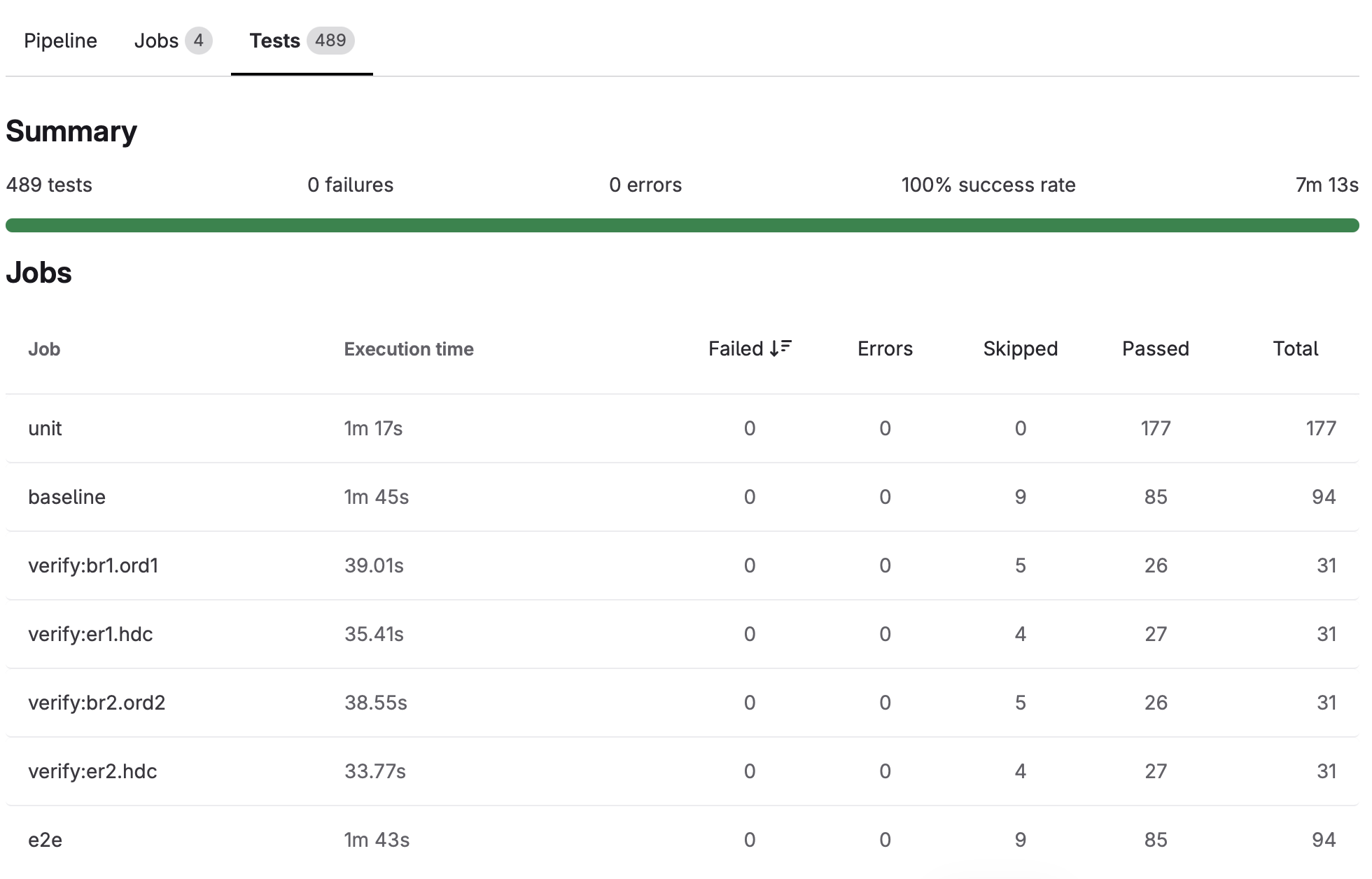
489 tests!!!
Current stack for the curious: MikroTik RouterOS 7.23.3 and 7.24 (mixed, which is how I found bug #4), WireGuard overlay, OSPFv2 and OSPFv3, full mesh iBGP, eBGP to two upstreams, pfSense peering eBGP with both edge routers. GitLab CI on an on-prem runner, stock python:3.12-slim, no registry, no privileged runner. Ansible with serial: 1, pytest parametrised per router, JUnit XML into GitLab’s test tab.
Even when tests failed miserably, the network was mostly fine the whole time. What was broken, REPEATEDLY, was my ability to prove it was fine with every single test. Once you get there, it’s mostly ok.
Next up: I haven’t thought about that yet, was too excited for this one. Maybe IPv6? Maybe breaking down the /24 into meaningful prefixes? Maybe diving into the generator code? I don’t know…