Update: Sophos released an official guide on how to get Lync Web Services to work over the UTM’s WAF. https://sophserv.sophos.com/repo_kb/120454/file/Configuring%20UTM%20firewall%20for%20Lync%20connectivity.pdf
Using a Sophos UTM or Astaro Security Gateway (ASG) appliance? You can use it to reverse proxy to your Lync front ends!
v8 a feature called Web Application Firewall, which is a nicely wrapped version of Apache mod_proxy, and can be configured to reverse proxy your Lync Mobility and simple URLs, Office Web Apps and can also work with Exchange and pass Outlook Anywhere. The added benefit is that you can configure rules to block Cross-Site Scripting (XSS) and SQL Injection type attacks, among other things.
If you have the subscription, here’s how you set it up with Lync 2013:
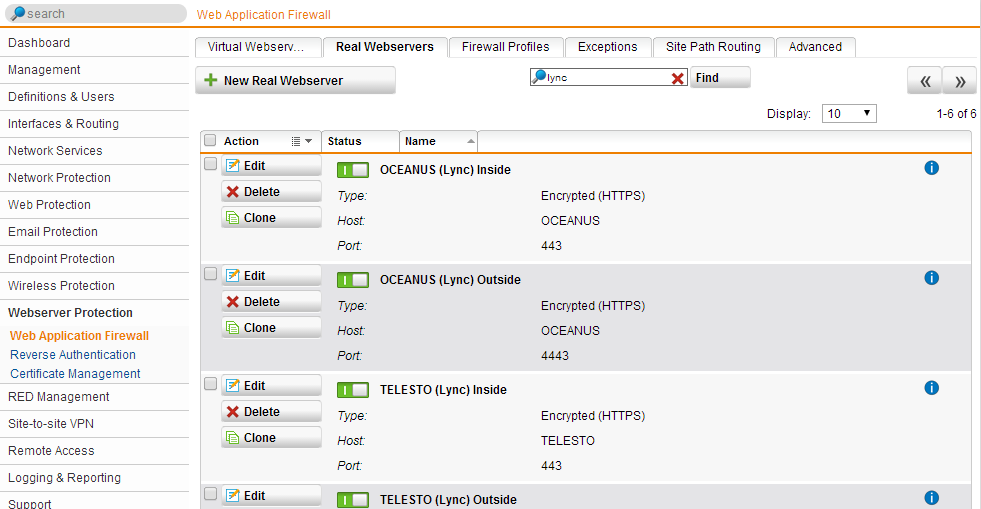
Configure your Lync Front Ends as Real Webservers. You will need to configure two servers for each FE, one for 8080 and another for 4443. If you plan on using the proxy for internal loopback (to avoid cert conflicts), then you will need 4 real servers, one for each port (80, 443, 4443, 8080). If you only want SSL, then skip the 80 and 8080:
Then configure your Virtual Web Server (I will assume you already uploaded a valid certificate to the Sophos appliance). Make sure to check Pass Host Header, and you can enable HTTP redirection so your end users are happy when they skip HTTPS prefixes.
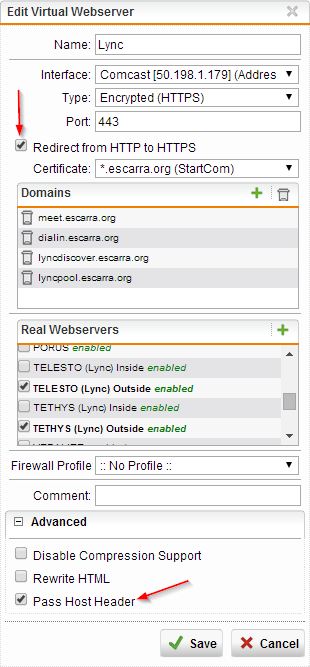
Save it, enable it, and DONE!
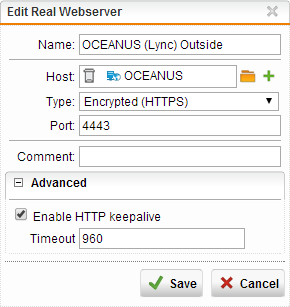
NOTE: If you have issues with the Lync iOS client resetting the connection, you can increase the timeout on the Real Webservers to 960 or 1200, but you will need to be on firmware version 9.204-19 or greater, since the feature was introduced then.
Hi Markus,
Most of the time I’ve seen this happen because of a SNAT rule not being in place, or the NAT IP address used in the Lync Topology did not match the one used externally for the AV service. I’ve set up proper dual-DMZ configurations using Sophpos UTM where every modality is fully functional, and can probably help you with this. Are you still looking for help with this?
Hi. I just got further but I’m not there yet. I lookat the the sophos guide and notices they said to import the Lync-Setup generated (I requested a new cert with exportable private key) into sophos. I checked off all the listed host names that were included in it but “lyncdiscoverinternal.dynamic-gamers.com” and “lyncdiscover.dynamic-gamers.com” will not stay checked off (the rest are fine).
As of now I can reach the server over the internet but on the Office client and Lync for Android 2010, I fail to log in (it tells me to check your credentials, ect…) and the WAF Log shows only after i enter my password:
“2014:08:07-06:05:13 utm reverseproxy: id=“0299” srcip=“199.119.233.185” localip=“99.249.16.88” size=“1293” user=”-" host=“199.119.233.185” method=“POST” statuscode=“401” reason="-" extra="-" exceptions="-" time=“15831” url="/WebTicket/WebTicketService.svc" server=“lync.dynamic-gamers.com” referer="-" cookie="-" set-cookie="-" "
I am currently looking into it :x also Lync for Android 2013 just says it cannot find the server and i get
“2014:08:07-09:10:59 utm reverseproxy: id=“0299” srcip=“199.119.233.152” localip=“99.249.16.88” size=“1293” user=”-" host=“199.119.233.152” method=“GET” statuscode=“401” reason="-" extra="-" exceptions="-" time=“15387” url="/autodiscover/autodiscoverservice.svc/root/user" server=“lync.dynamic-gamers.com” referer="-" cookie="-" set-cookie="-" "
Again, thanks very much!
I probed a couple of things based on the URL’s you mentioned and looks like everything works fine. I get the XML from lyncdiscover and that means WAF is directing the traffic properly based on the hostname…
One thought, did you import your private CA into the Root cert authorities of your Android phone? If you’re not using public certs, you’ll need to do this…
I imported the private CA assigned to the webserver into sophos and i have my AD-CS CA Cert in my root cert authorities of my computer and phone.
Btw the only internet access i currently get is with Android Lync 2010. 2013 is not functioning at all and the desktop client still tells me I have bad login information after entering the password.
2014:08:07-09:57:27 utm reverseproxy: id=“0299” srcip=“199.119.233.152” localip=“99.249.16.88” size=“1293” user="-" host=“199.119.233.152” method=“POST” statuscode=“401” reason="-" extra="-" exceptions="-" time=“17020” url="/WebTicket/WebTicketService.svc" server=“lync.dynamic-gamers.com” referer="-" cookie="-" set-cookie="-"
It still shows that even after using the proper NETBIOS login “dynamic-gamers/psionic” under my normal login “psionic@dynamic-gamers.com”
New report on this. Currently only the iphone app actually connects over the internet (but does not function with calling…). The android app instantly says there is no lync server and the desktop client (most important) goes to log in but fails when it tries to connect to “sipexternal.dynamic-gamers.com” which is not configured at all in the front end.
Are you using a Edge Server, Is it possible to have remote conferencing using Reverse Proxy to the Front End, if not, I may be screwed as I have no idea how to have clients connect through edge as it doesn’t have autodiscover, nor IIS, and that running it on one FQDN / IP doesn’t work for all services if they were all to use WAF as i can only bind the one port as the real server (in this case, the Edge Access Server)
Also, There is no WAF error when the conference call fails from the iphone (internet) to my pc (local)
Thanks Again.
Great article! We were able to get everything setup and working internally, and 99.9% externally. I say mostly externally because the only thing externally that does not work is the PowerPoint presentation but only through the web app. Externally through the full Lync Client works fine.
Externally all functions work through the full Lync windows client. Externally all functions including whiteboard work through the web app except the Powerpoint. Externally Mobile phones and tablets also work.
Do you have any ideas?
Our setup is pretty basic, We have the Office Web apps server sitting inside the network. We have one Lync front end server sitting inside the network. And we have the Edge server sitting in the DMZ.
Again all functions work externally except PP presentation through web app.
No I have not found a solution and it’s still a problem. I opened a Microsoft support case but because the reverse proxy configuration is not supported they did not want to assist and blamed the reverse proxy as the issue, which i agree it will be the issue. We are very close to planning a cut-over to move everything to a supported config using Kemp. We have Kemp up and running now just need to start planning moving the reverse proxy over.
The Microsoft tech pointed me to this site which says the reverse proxies that are supported among other things.
http://technet.microsoft.com/en-us/office/dn788945.aspx
Tony, I was able to reproduce the issue on my end and the fix is to make sure “Pass Host Header” is enabled on the virtual webserver that is proxying your OWAS. Honestly I had never tried to host PPT’s over the Lync Web App in this particular scenario over Sophos UTM, but checking the “Pass Host Header” definitely made it work. Let me know if that helps or not. Good luck!
Gonzalo
Ugh I was hoping that would do it for you, since when I tested the exact same issue showed up but was resolved by checking that box. However, upon further investigation, I noticed that the Firewall Profile I was using had nothing except Outlook Anywhere (RPC over HTTP) and “Block clients with bad reputation” checked. It was not really filtering any vulnerabilities. If you’re using the Common Threats Filter, you will need to exclude the following rules that I found interfere with OWAS:
981204 950120 981176 981173 950109 973338 973347 981172
Only after adding those exclusions does the OWAS work when Common Threats is enabled in the profile. And there may be more exclusions you can nail down by looking at the Log while presenting. The easiest thing to do would be to create a new Firewall profile called “Office Web Apps Server” and put these exclusions in there. Make sure “Outlook Anywhere” is enabled on that profile as well otherwise the Lync client will have issues connecting to OWAS. Hope this works for you!
Gonzalo
We do not use the firewall profile. Also when doing our tests no ports come up as blocked in the log, this is what has made it a bit difficult to troubleshoot and figure out.
I really wouldn’t worry about it since the mgmt here wants us to be in a supported configuration regardless, which means we will eventually be moving everything to Kemp.
Hopefully these suggestions can help someone else though.
I appreciate your replys.