The Dell PERC H200 is a very basic RAID controller that does not have battery-backed cache, and therefore does not let you enable Write Caching within the OS. Writes using the H200 adapter can be very slow, so much that Windows Updates could take 2 to 3 hours on a RAID1!
To force enable write cache on an H200 adapter (at your own risk), do the following:
- Go to www.lsi.com and search for the latest MSM (or MegaRAID Storage Manager). At the time of this writing, it is 12.05.03.00. Install it, then run it.
- Log in to MSM using your local/domain admin credentials.

- Under the Logical tab, select the VD you want to enable write cache for, then right click and Set Virtual Drive Properties.
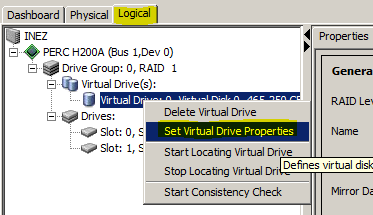 Enable the write cache and accept all dialogs.
- Confirm write cache is enabled using Device Manager.
Keep in mind that this setting could cause data corruption if you don’t gracefully shut down your server during a disk write operation. What’s why it’s disabled by default and difficult to enable. Don’t leave this enabled on a production server…
 Mark Weiss
 Gonzalo Escarra
 Ondrej
 Arjun Anand
 Mark Kotch
 Matt
Matt
 Alain
Alain
 ThaaVic