I’ve run my share of mail servers over the years (there’s a Zimbra post from 2009 in this blog’s archives). And they’re always the same thing: at least one VMs, doing ten jobs, and every one of those jobs could take the others down with it.
In a related topic, last weekend I decided to overhaul my neighborhood’s website with Claude’s help, and also figured it’d be nice to have e-mail on that domain. Because I moved off Wordpress into a fully serverless setup with S3, DynamoDB, Lambda Web Functions (and OG Lambdas too), API Gateway and CloudFront running all the things and needed to stay cheap on AWS, I wanted a cheap e-mail “server” too.
Could it also be serverless?
So in a few sleepless nights I built sesame (Serverless Email, Storage And Messaging Engine), a complete mail system for my own domain that runs on serverless AWS. It receives, sends, stores and searches mail, it has a web app and an admin console, and there’s not a single server, container, VPC or cluster in it.
The thing I wanted to prove: if you break a service down far enough, all the way to the functions, you can move the WHOLE thing to serverless. Not just the stateless bits at the edges while the “real” server keeps running in the middle. All of it.
Don’t want to keep reading and want the code? Go here: https://github.com/gescarra/sesame
This is a personal side project, built on my own time with my own tools and accounts. Opinions are mine. It’s also a proof of concept, not a product, so please don’t move your company’s mail onto it because a blog post told you to. Please don’t. If you do, that’s on you, mmkay?
That server in the closet runs my mail?
For years I’ve run Zimbra (6.0 I think? It was before VMware bought them), then Exchange 2010 all the way to 2019, and since it went EOL now I run Mailcow “dockerized”
If you’ve never run one, here’s what lives on a “simple” mail server:
- an SMTP server
- spam and virus filters, with rules you’re always catching up with
- a delivery agent that drops mail into mailboxes
- the mail store itself, on disks you RAID and back up and pray over, or replicate elsewhere
- a database for mailbox metadata, plus a search engine next to it
- an outbound queue and something to deal with bounces
- a user directory
- webmail and an admin panel
- something for phones to sync with
- and a pile of cron jobs nobody remembers writing
All that on one machine. You scale it by getting a bigger machine. You make it highly available by building a second one and figuring out how to keep the mailboxes in sync. Sometimes it’s easy (Exchange DAG) and sometimes a pain in the ass.
Taking it apart
The first step was boring and important: list every job that box does, one at a time, and find who should own it.
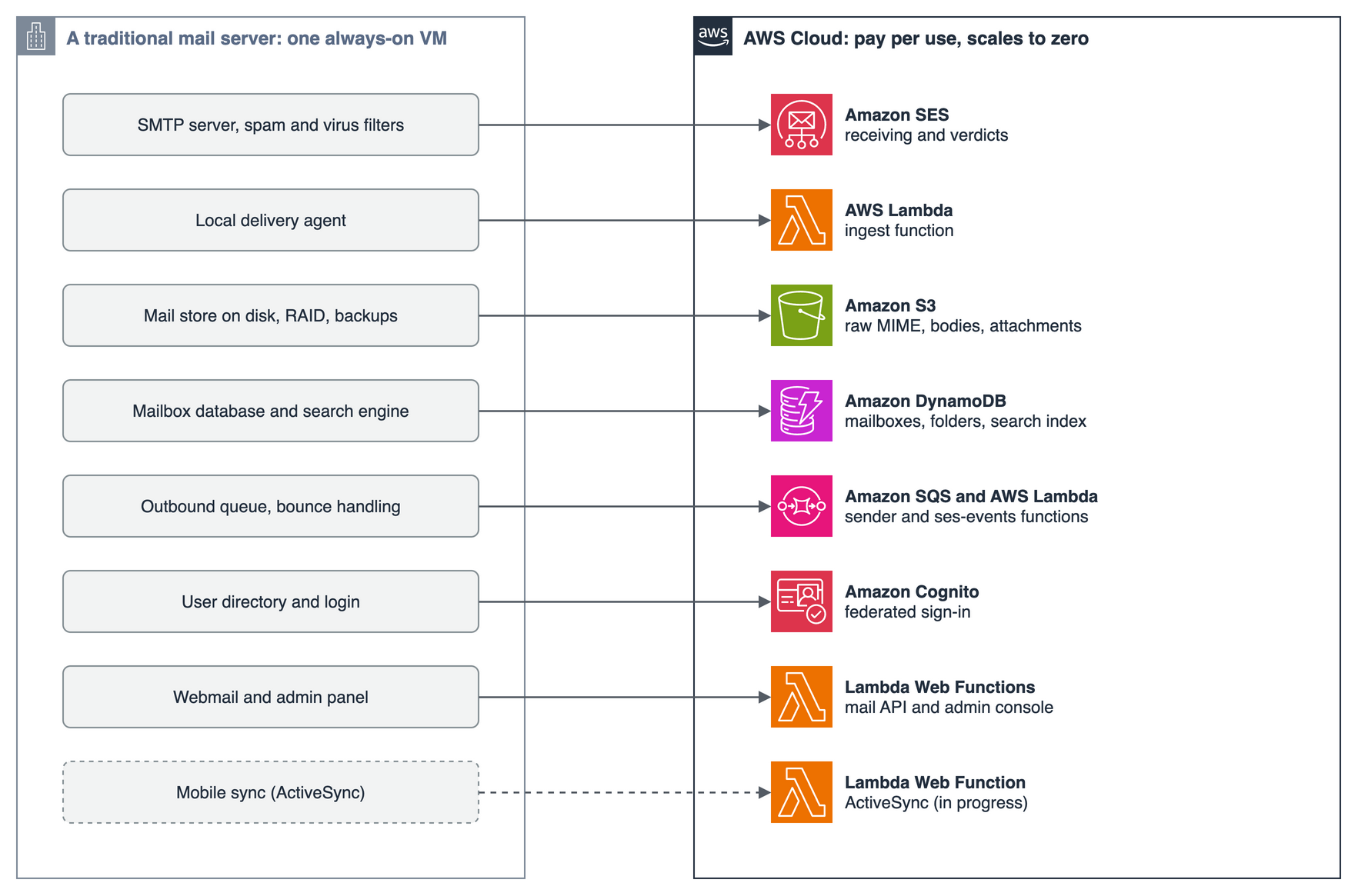
A bunch of them just disappear into managed services:
- SMTP, spam and virus filtering → Amazon SES receives the mail and hands me spam, virus, SPF, DKIM and DMARC verdicts on every message. No daemon, no filter rules. Easy…
- The mail store → S3 and DynamoDB. No disks, no RAID, no backup rotation.
- The user directory → Cognito, federated to whatever SAML or OIDC identity provider you already have. sesame never sees a password.
What’s left is actual application logic, and that’s where the functions come in. There are six:
| Function | Kind | Job |
|---|---|---|
ingest |
Lambda (SQS) | Parse incoming mail, sanitize HTML, index it, deliver it to each mailbox |
sender |
Lambda (SQS) | Hand outgoing mail to SES, exactly once |
ses-events |
Lambda (SQS) | Track deliveries, bounces and complaints, keep the suppression list |
purge |
Lambda (SQS) | Delete a removed mailbox’s mail in the background |
api |
Lambda Web Function | JSON API for the web app |
admin |
Lambda Web Function | Server-rendered admin console |
The replacement I’m proudest of is the mailbox database. Instead of a relational DB plus a search cluster, everything is in DynamoDB, including full-text search. The search index is just one item per word per message in the same table, queried by prefix. An OpenSearch domain would cost more sitting idle than the entire rest of sesame costs in a busy month, so no thanks.
What it looks like now
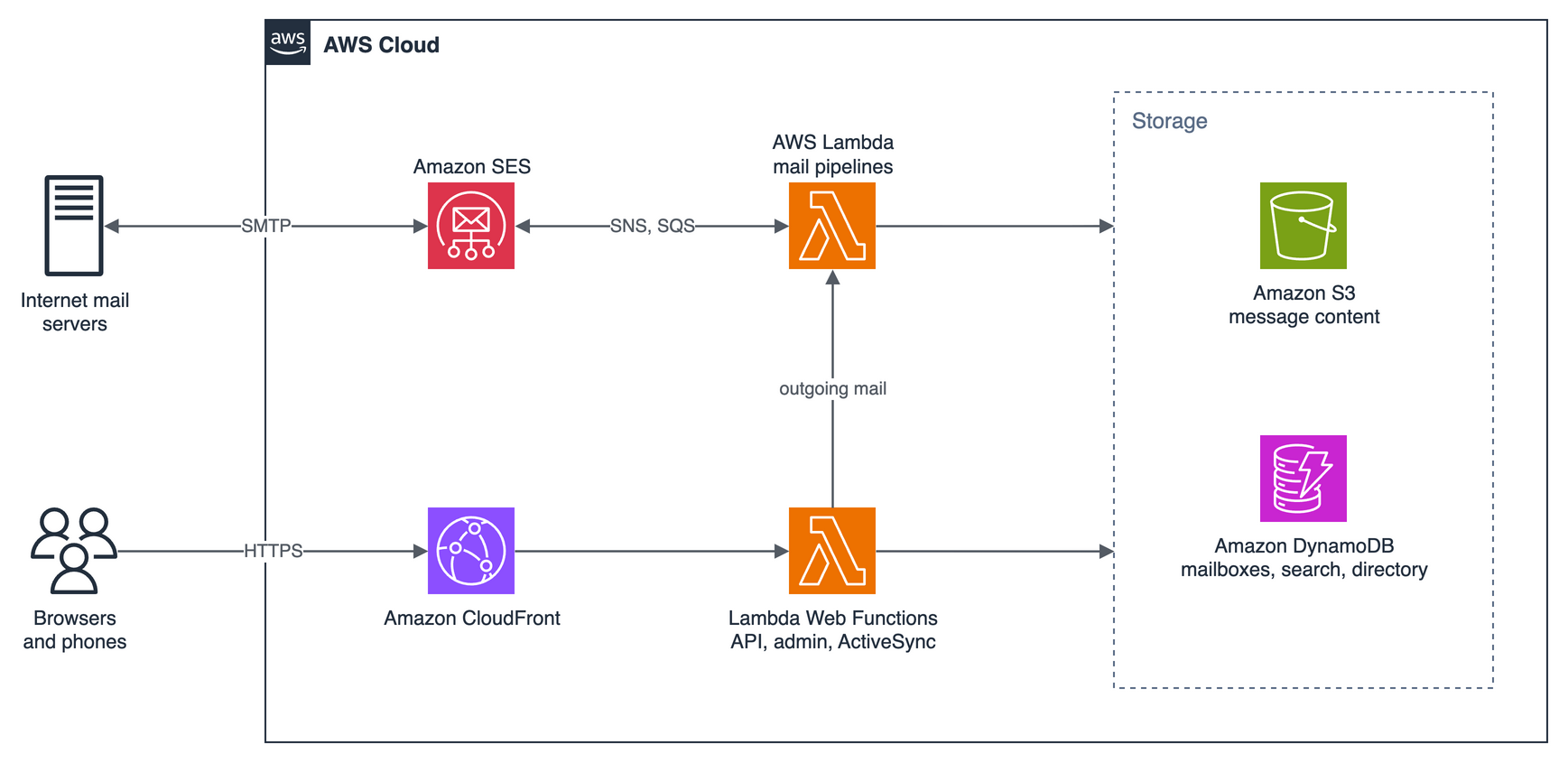
Two halves, and they only meet in storage and in queues:
The mail side is event driven. Mail arrives, SES drops the raw message in S3 and publishes a notification (who it’s for, plus the verdicts). SNS pushes that into an SQS queue and ingest delivers it. Sending is the reverse: the API builds the message once and routes it by recipient. Local recipients go straight onto the ingest queue and never touch SES. Everyone else goes onto the send queue for sender. Bounces and complaints come back the same way and update the message’s delivery status.
The web side is just HTTP. A React app sits on S3 behind CloudFront, and the same distribution sends /api/* and /admin* to two Lambda Web Functions. CloudFront signs every request with origin access control, so there’s no API Gateway and no shared secret header to leak.
How far is “far enough”?
IMO a piece is ready for serverless when it checks three boxes:
- It does one job and finishes fast.. Example: Delivering one message to one mailbox takes milliseconds, THAT’s the task. Even deleting a huge mailbox gets chopped into batches, and
purgehands the rest of the work to a fresh invocation before it runs out of time. - It keeps no state of its own. Everything lives in DynamoDB and S3. Any copy of any function can pick up any piece of work, so that scales beautifully.
- It’s safe to run twice. SQS delivers at least once, so every consumer is idempotent. Message IDs are derived from the SES message ID and the mailbox, so a redelivered message lands on the same key and gets discarded. The sender takes a lock before calling SES, so a retry never sends your email twice.
Getting everything to check all three took some deliberate (and sometimes annoying) decisions. A full mailbox doesn’t bounce mail back to a probably-forged sender; the message waits in a dead-letter queue until an admin frees space and redrives it. Deleting a mailbox kills it in the directory in one transaction and leaves the slow part to purge, because we don’t want to hold the line for the background tasks.
Once every piece passed, there was nothing left that needed to be a server. That’s the whole trick. Deconstructing every function into pieces small enough and event-driven enough that you can just rebuild it with little LEGO bricks of AWS services.
THIS is why I love cloud, Not because it can run VMs, but because you can do this kind of stuff for cents.
Why Web Functions for the HTTP side
The API and admin console run on Lambda Web Functions, which run an ordinary HTTP server. The API is a Hono app on Node’s HTTP server, so it runs unchanged on my laptop and the tests call it like any web server. No event adapter, no framework gymnastics.
Two things make them a great fit here:
- You pay for CPU, not for waiting. Most of a mail API request is waiting on DynamoDB, S3 or SQS. Web Functions bill active CPU, so the waiting is free. My deployment averages about 100 ms of CPU per request.
- One environment handles many requests at once (64 by default), so every open browser tab polling every 60 seconds shares a single warm environment.
The admin console is a full server-rendered app with zero client-side JavaScript, running as its own function with its own IAM role. Admins can manage mailboxes and redrive queues, but they can’t read anyone’s mail. I like that a lot more than “trust me, I won’t look”.
The money
Everything is pay per use, so the bill follows activity. us-east-1, October 2026 prices:
| Scenario | Monthly |
|---|---|
| Idle | about $0.50 (that’s the Route 53 hosted zone) |
| 1,000 messages received | about $0.30 |
| 1,000 messages sent | about $0.20 |
| 10 people, typical use | about $3–4? |
Fifty cents a month to sit there doing nothing. No VPC, NAT gateway, OpenSearch, RDS or always-on compute. Even the nine CloudWatch alarms fit in the free tier. The biggest per-message cost is actually the search index, and you can turn off body indexing to cut that by about 80%.
Scaling is the same story: there’s nothing to scale. SES receiving has no servers. A burst of mail lands in a queue and Lambda adds consumers as it grows. DynamoDB is on-demand. Web Functions add environments up to whatever limit I set (the admin console is capped at two, because a handful of admins will never need more). The limits I’ll eventually hit are account quotas, not capacity I forgot to provision.
And then there’s the “what’s next?”. Multi-region active/active? no problem! You’ve got DynamoDB Global Tables. AI agents? Yup, DynamoDB Vector Store is a thing now, or even S3 Vectors, you choose! Phone client? build an ActiveSync abstraction layer using Lambda Web Functions (that’ll be next week)
The real bonus
Cost and scale are the usual reasons people go serverless. The one that actually got me excited is different: the managed services keep shipping features, and once your data lives in them, you get those features with configuration instead of engineering.
Here’s the example. Running mail in two Regions, both taking reads and writes. On a traditional mail server that’s a project: replicate the database, the search index AND the mailbox store, figure out what happens when the same mailbox changes in both places, test failover until you trust it. Most small orgs never get there.
In sesame, every bit of mailbox state lives in two DynamoDB tables. DynamoDB global tables replicate a table to other Regions, and every replica takes reads and writes. In the console: open the table, Global tables, Create replica, pick a Region. Done. In Terraform it’s a few lines:
resource "aws_dynamodb_table" "mail" {
  # ... everything that's already there ...

  stream_enabled   = true
  stream_view_type = "NEW_AND_OLD_IMAGES"

  replica {
    region_name = "us-west-2"
  }
}
That’s the heavy lift of multi-Region mail, done. Replication typically lands in about a second, and DynamoDB sorts out conflicting writes for you.
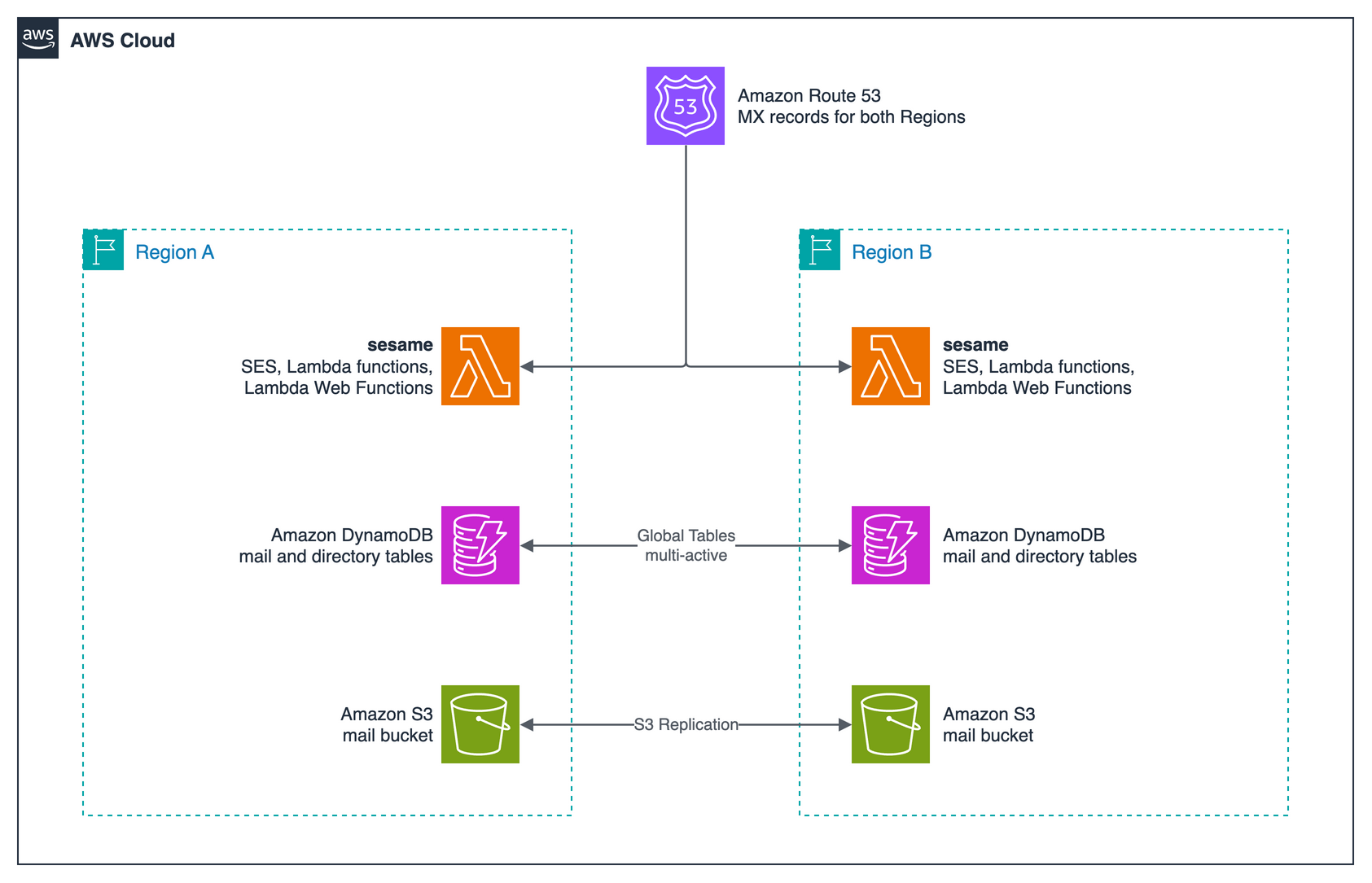
Because none of the functions keep state, the rest of the stack just deploys again in the second Region as is. To finish the picture:
- Message content: two-way S3 Replication between the mail buckets.
- Receiving: SES receiving in the second Region, plus an MX record for each. Sending servers fall back to Region B if Region A stops answering, which is how MX has always worked.
- Sign-in: a Cognito user pool in Region B that trusts the same identity provider, and the same session cookie key in both Regions so nobody gets logged out when they switch.
To be clear, sesame doesn’t turn this on by default. because it’s a single-Region setup tuned to cost nothing when idle BY DESIGN and out of my immediate need. Replicas mean a second copy of every write so that’s more money out of the neighborhood’s budget. But… the data layer is the part one would normally bitch about, and here it’s just a setting.
Sharp edges
Global tables make replication someone else’s problem, but your app still has to play along:
- Last writer wins. In the default mode, if the same item changes in two Regions at the same moment, the latest write wins. Message delivery is fine with that, since the same message always lands on the same key. Counters (unread counts, mailbox usage) can lose an update. Keep each mailbox writing to one Region at a time, or recompute counters every so often. There’s also a strongly consistent multi-Region mode if you’ll pay for it in write latency.
- Transactions are Regional. Atomic where they run, but the writes can show up on the other side at slightly different times.
- The table and the bucket replicate separately. A message’s DynamoDB item can beat its body to the other Region, so readers need to retry or fall back.
- SES is Regional. Separate sending quota, reputation, production access and suppression list per Region.
These are design decisions, not infrastructure projects. Which is exactly the point.
What I’m working on now: my phone
A mail system I actually use has to work with the mail app on my phone. And the protocol for that, the one iOS Mail and a lot of Android apps speak out of the box, is Exchange ActiveSync. Back in 2009 I was bolting Funambol onto Zimbra to get phones to sync, so this one’s been a long time coming.
So I’m building an ActiveSync layer as a third Lambda Web Function, so my phone can sync folders, get new mail pushed to it, and send.
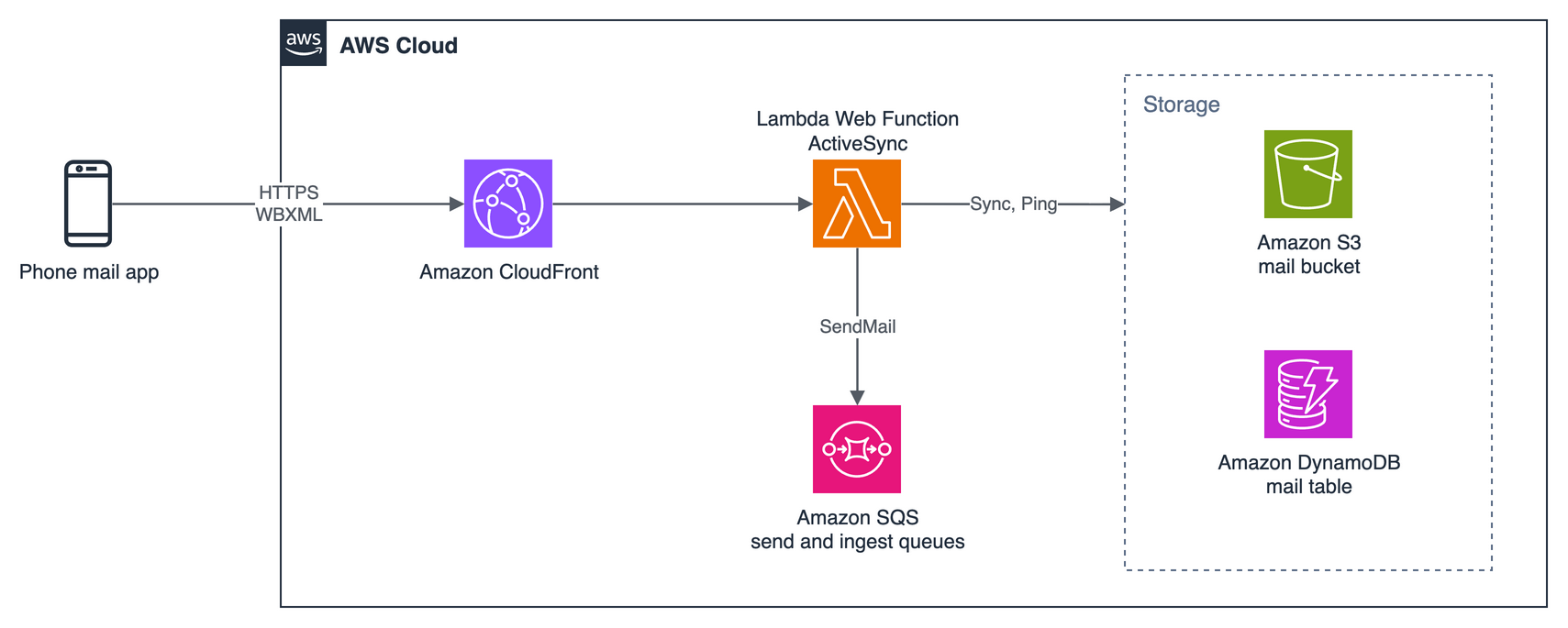
ActiveSync is just HTTP: the phone POSTs WBXML-encoded commands to one endpoint. FolderSync lists folders, Sync grabs changes, SendMail sends. That fits sesame really well:
- No new pipelines.
SendMailgoes through the same routing the web app uses: local recipients onto the ingest queue, external ones onto the send queue. Delivery status, bounces and suppression all just work. - No new data. Same table, same bucket. Read something on the phone and it shows as read in the web app.
- Push without paying for idle connections. This is the fun one. ActiveSync does push with
Ping, a long-held HTTP request that the server answers when something changes or a heartbeat runs out. On anything billed by wall-clock time, a bunch of phones each holding a request open adds up fast. Web Functions bill CPU, and one environment serves a lot of concurrent requests, so a phone sitting there waiting for mail costs basically nothing. This workload is what convinced me Web Functions were the right home for it.
The catch I’m dealing with: those requests go through CloudFront, which has an origin response timeout, so heartbeats have to stay under it and the server has to tell the phone what range it’s allowed to use.
More on this once it works end to end.
Try it
The code, the Terraform, and all the architecture decisions (with the why behind each) are on GitHub:
You need an AWS account, a domain or subdomain you can point MX records at, Node.js 24, pnpm and Terraform. Pick a Region that has both Lambda Web Functions and SES receiving. The repo’s quickstart walks through the whole thing. And when you’re done, terraform destroy. It deletes all the stored mail, so mean it.
Wrapping up
A mail server looks like the last thing you’d move to serverless: stateful, long-running, a dozen daemons glued together. But take it apart job by job and almost every piece turns out to be either a managed service or a small, stateless, safe-to-retry function. Get it into that shape and you get low idle cost and scaling for free, plus whatever the underlying services ship next. Global tables turn the hardest part of multi-Region mail into a checkbox, and the same shape lets me bolt on new front doors, like ActiveSync for my phone, without touching anything behind them.